Co-parenting that finally feels in sync.
ChildLink gives separated parents one shared calendar for custody, pickups, drop-offs and activities, so everyone always knows who has the kids, and when.
Free to start · No credit card required

Tuesday: swimming 5pm, Dad's turn
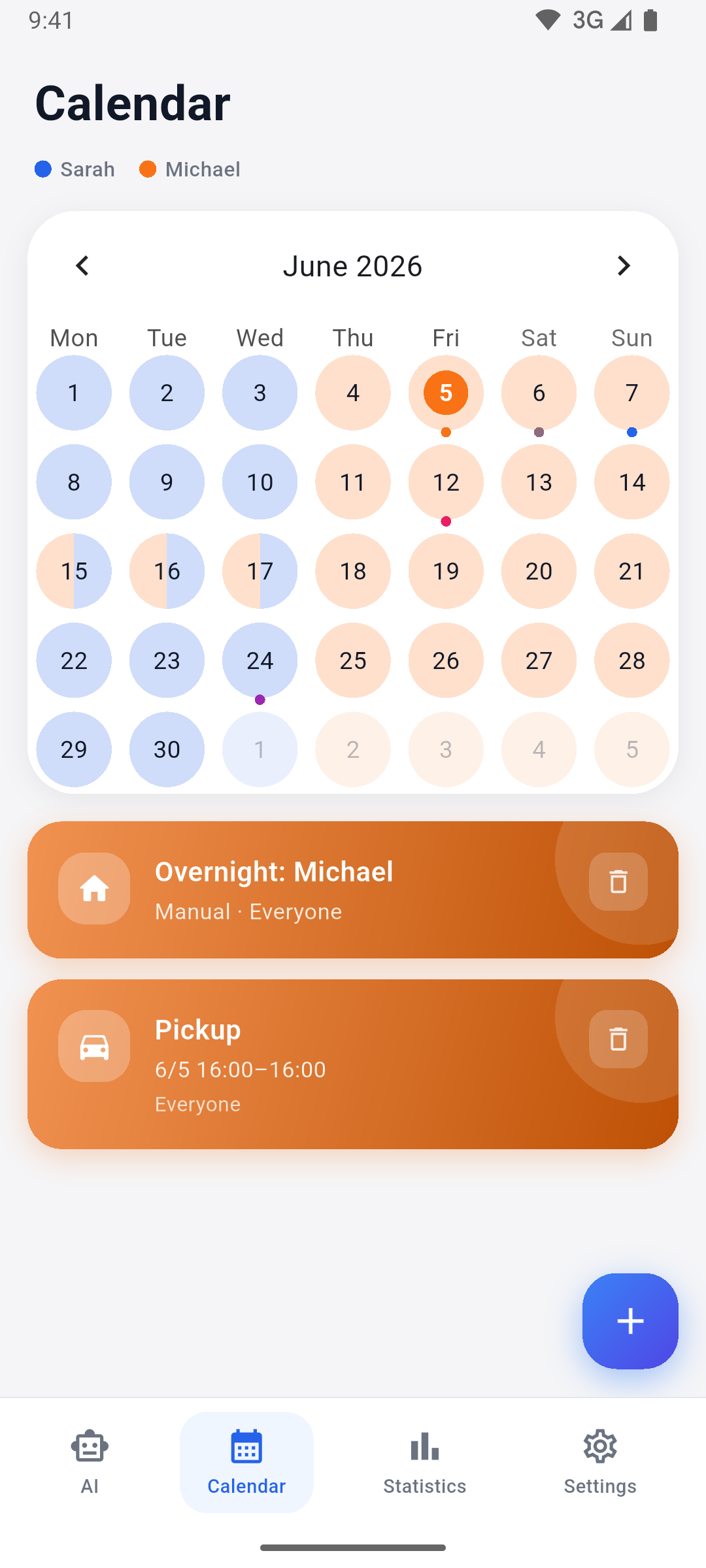
Everything in one place
Built for two homes, one schedule
From the everyday handover to the big-picture overview, ChildLink keeps both parents on the same page, without the back-and-forth texting.
Shared calendar
One source of truth for both homes. Overnight stays, pickups, drop-offs and activities, colour-coded by parent.
Custody patterns
Set a weekly or alternating-week rhythm once and let ChildLink fill the calendar. Override any single day in a tap.
AI assistant
Just type “Add a pickup next Tuesday at 4pm.” The assistant creates entries and patterns in plain language.
Custody statistics
See the overnight split per parent and per child across any date range: clear numbers, no spreadsheets.
Google Calendar sync
Push the shared schedule straight into your everyday Google Calendar so nothing slips through the cracks.
Smart reminders
Get a nudge before every handover and a weekly digest of what’s coming up, on whichever device you carry.
Family & spectators
Invite grandparents or a caregiver as read-only spectators, so the people who help can stay in the loop.
Audit log
Every change is recorded and shareable: a transparent, tamper-proof history both parents can trust.
Cost sharing
Log every child-related expense, split it at any percentage, and see who owes whom. Attach the receipt so the number is never in doubt.
How it works
Set up in minutes, sorted for good
- 1
Create your family
Add your children and invite the other parent with a simple 8-character code. Everyone gets their own secure login.
- 2
Set a custody pattern
Choose a weekly or alternating-week rhythm. ChildLink fills in the calendar automatically from there.
- 3
Coordinate in real time
Add pickups, activities and overnight stays. Need an exception? Override any day without breaking the pattern.
- 4
Stay in sync
Get reminders before every handover, sync to Google Calendar, and always know who has the kids.
Just tell ChildLink what changed
Plans shift. Instead of tapping through screens, describe it in a sentence and let the built-in assistant handle the rest.
- Understands plain language, no forms, no menus
- Creates one-off entries and recurring custody patterns
- Understands and replies in any language you write in
Add a pickup next Tuesday at 4pm
Done. I added a pickup for Mia next Tuesday at 4:00 PM, assigned to Dad. Want a 30-minute reminder too?
Yes please, and make it every other week
Got it. Created an alternating-week pattern with a reminder. You’re all set.
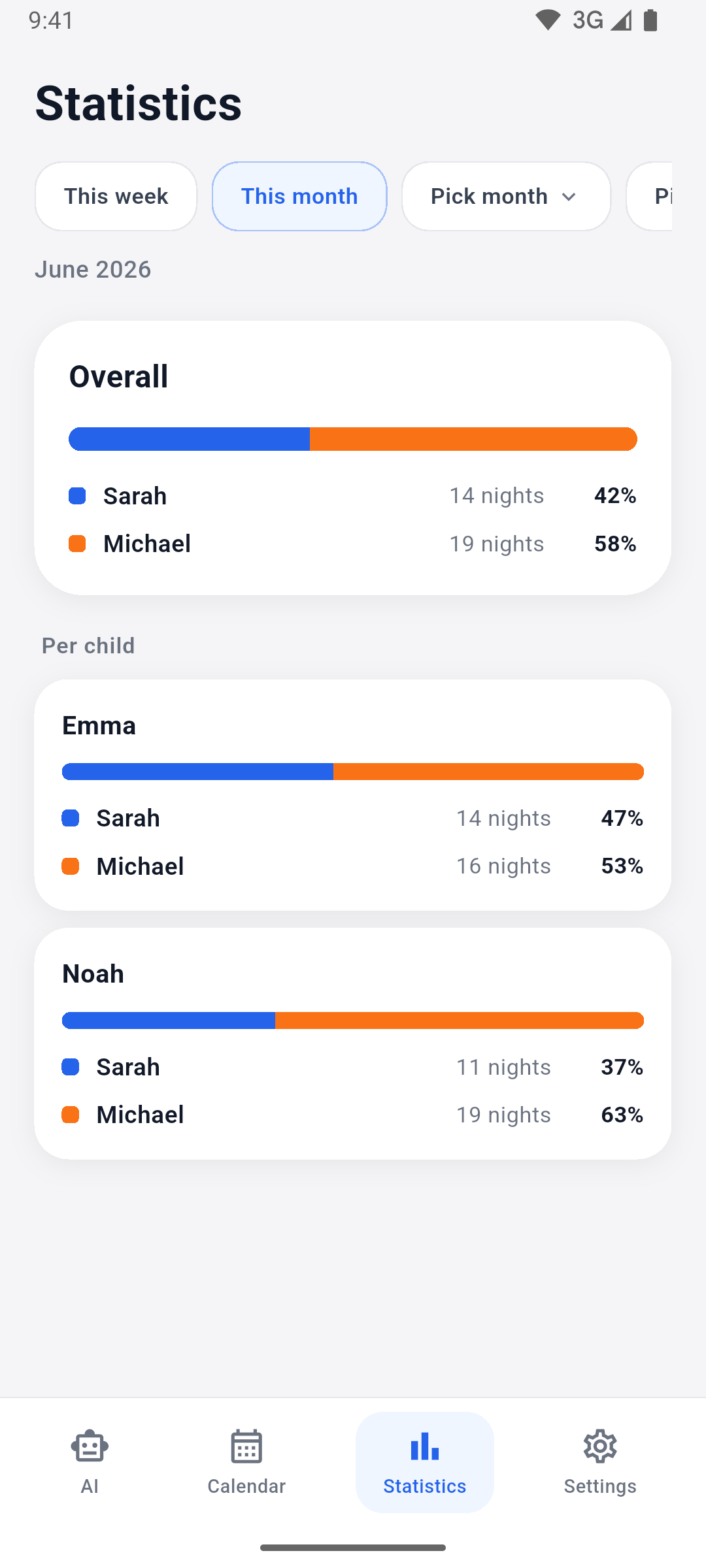
Custody statistics
Fair time, clearly measured
ChildLink turns your shared calendar into clear numbers, so conversations about custody time start from facts, not memory.
- 50 / 50
- See the overnight split between parents at a glance
- Per child
- Break custody time down for each child separately
- Any range
- Pick a week, a month, or the whole year
Pricing
Start free, upgrade when you need more
No credit card to begin. Cancel anytime, your calendar stays yours.
Free
Everything two parents need to get organized.
€0 forever
- Shared calendar for two parents
- Custody patterns & per-day overrides
- Custody statistics
- Smart handover reminders
- Up to 2 children
- 1 AI assistant conversation / month
Premium
More room to grow, plus calendar sync.
€4.99 per month
- Everything in Free
- Cost sharing with receipts
- Unlimited children
- Google Calendar sync
- 10 AI assistant conversations / month
Family
The full picture, with extra hands on deck.
€6.99 per month
- Everything in Premium
- 30 AI assistant conversations / month
- Spectator access for grandparents & caregivers
- Full, shareable audit log
Prices are indicative.
FAQ
Questions, answered
Is ChildLink really built for both parents?
Yes. Each parent has their own secure login, and the calendar is colour-coded so you can instantly see who has the kids. Invite the other parent with a single 8-character code.
What if our schedule isn’t a simple week-on, week-off?
Patterns handle weekly and alternating-week rhythms, and you can override any individual day for holidays, swaps or one-off changes, without breaking the underlying pattern.
Can grandparents or a nanny see the calendar?
On the Family plan you can add spectators (read-only viewers like grandparents or caregivers), so the people who help out always know the plan.
Does it work with Google Calendar?
ChildLink can push the shared schedule into your Google Calendar, so handovers and activities show up alongside the rest of your day.
Is our family’s data private?
Your calendar is only visible to the people you invite. ChildLink is designed for adults exercising parental responsibility, and your data is never shared with other families.
How much does it cost?
ChildLink is free to start with everything two parents need. Upgrade to Family for unlimited AI, statistics, spectators and the audit log whenever you’re ready.
Bring calm to your co-parenting
Download ChildLink and give both homes one shared, dependable schedule. Free to start.